In today’s world, data is extremely important for businesses, researchers, marketers, analysts, and developers. Data analysis has made our work much easier, but analyzing large and complex datasets can still be challenging. Traditional tools are powerful, but they often require programming knowledge and a lot of manual effort.
Now, with AI apps for data analysis, you can simply ask questions in your own words and easily understand the results. These tools analyze data, provide predictive insights, generate visualizations, and allow you to focus on understanding the outcomes. They are incredibly helpful, and I have also included some of my personal experiences with them.
Whether you are a business professional, a data scientist, or a non-technical user, AI apps can make your workflow faster and more efficient. Below, we review the top 10 AI apps that are the most useful and trending in the field of data analysis.
1. Tableau AI — Visual Analytics and Smart Insights
Tableau has always been a leader in data visualization. With AI integration, this tool now offers smart data analysis that not only displays graphs but also helps in understanding the data more effectively. Tableau AI allows you to run queries in natural language, create predictive visualizations, and build interactive dashboards. This means you don’t need to constantly monitor dashboards manually, making it highly convenient and useful.
- Strengths: Visual exploration, smart recommendations, interactive dashboards
- Best for: Business intelligence and team reporting
- Why it excels: Makes data storytelling simple and accessible for non-technical users
2. Microsoft Power BI with AI Copilot — Enterprise‑Grade Smart Analysis
Microsoft Power BI is considered a powerful tool for enterprise-grade analytics. With AI Copilot, it provides enterprise users with natural language queries and automated data insights. Its seamless integration with Excel and Azure is an added advantage. It is mostly used by large organizations that handle massive amounts of data, making it highly useful for such environments.
Strengths: Natural language querying, anomaly detection, deep integration
Best for: Enterprise operations and reporting
Why it’s best: It delivers fast and scalable analytics at the enterprise level.
3. ChatGPT Advanced Data Analysis — Conversational Analytics

ChatGPT’s Advanced Data Analysis tool is perfect for non-technical users. It has become an essential tool for conversational data analysis. You can upload CSV or Excel files and ask complex questions, and the AI provides visualizations, Python code, and clear explanations. Personally, I’ve found it extremely helpful.
Strengths: Conversational queries, ad-hoc analysis, code generation
Best for: Non-technical users, quick exploratory analysis
Why it’s best: Makes understanding data easy for any user.
4. RapidMiner — Drag & Drop Machine Learning

RapidMiner is ideal for building machine learning and analytics workflows with its no-code interface. You don’t need to write any code. If you want to perform advanced Machine Learning and Data Science without coding, this tool can be extremely helpful. It assists in testing and deploying predictive models, and its Explainable AI feature helps build trust in the results.
Strengths: Visual workflows, no-code ML, explainable AI
Best for: Predictive analytics and ML prototyping
Why it’s best: Suitable for tasks ranging from beginner to advanced ML projects.
5. KNIME Analytics Platform — Flexible Open-Source Tool

KNIME is an open-source platform ideal for data wrangling, machine learning, and analytics. Known for its “low-code/no-code” approach, it allows you to create workflows by simply dragging and dropping nodes, with no coding required. With Python and R integration, you can build complex workflows. This makes it highly useful for a variety of data projects.
Strengths: Open-source, modular workflows, flexible
Best for: Advanced data projects
Why it’s best: Strong community support and high adaptability.
6. IBM Watson Analytics — Smart Pattern Discovery
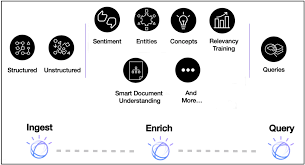
IBM Watson uses NLP and predictive analytics to discover patterns in your data. It performs deep analysis that might be difficult to do manually, and it suggests automated visualizations and relationships between variables. This makes it extremely helpful for understanding complex datasets.
Strengths: NLP insights, predictive discovery, smart summaries
Best for: Business research and pattern detection
Why it’s best: Guided analytics makes it easy and user-friendly for non-technical users.
7. Domo — Real-Time Cloud Dashboards
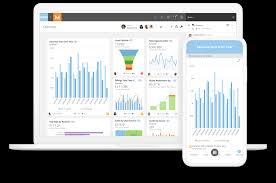
Domo is a cloud-native platform that provides real-time analytics and predictive machine learning. It is especially useful because it centralizes all company data in one place and delivers live updates. Team collaboration and cross-department dashboards are easy to set up, making it highly practical for businesses.
Strengths: Real-time analytics, multi-source integration
Best for: Fast-moving businesses, enterprise teams
Why it’s best: Cloud-based scalability and speed are excellent.
8. DataRobot — Automated Machine Learning and Model Lifecycle
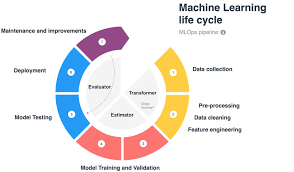
DataRobot simplifies the machine learning model lifecycle, making it ideal for companies that operate at scale. It supports building, deploying, and monitoring ML models. For regulated industries, features like explainability and governance are crucial, making it highly useful for compliance-heavy environments.
Strengths: AutoML, predictive robustness, enterprise governance
Best for: Regulated sectors like finance and healthcare
Why it’s best: Ensures compliance and performance monitoring with trusted AI.
9. MonkeyLearn — AI‑Powered Text and Sentiment Analytics

MonkeyLearn analyzes unstructured data such as reviews and social media comments. It is primarily used to understand unstructured data like emails, reviews, and support tickets. It is ideal for sentiment detection and topic classification, providing valuable insights through AI. This makes it extremely helpful for businesses.
Strengths: NLP text analytics, sentiment tracking
Best for: Marketing and customer feedback analysis
Why it’s best: Converts text data into structured, actionable insights.
10. Zoho Analytics — Natural Language AI aur Integration

Zoho Analytics, with Zia AI, converts natural language queries into actionable insights. It is highly useful for small and cost-conscious businesses. It integrates with hundreds of data sources and acts like a smart assistant, simplifying your data and making it much easier to understand.
Strengths: Natural language insights, easy integration
Best for: SMEs and multi-source analytics
Why it’s best: Provides powerful analytics with a simple, user-friendly interface.
Bonus: NetMiner — Network and Graph Analysis
NetMiner is ideal for graph and network analytics. It makes pattern discovery easy for social networks or interconnected data, making it extremely useful for understanding complex relationships.
How to Choose the Right AI App
1. Data Type: Numeric, text, structured, or unstructured
2. Skill Level: Coding required or no-code interface
3. Collaboration Needs: Team dashboards and data sharing
4. Scalability: Small datasets or enterprise-level operations
Examples by Use Case
Quick Insights: ChatGPT Advanced Data Analysis, Zoho Analytics
Enterprise Dashboards: Power BI, Tableau AI, Domo
Predictive Machine Learning: DataRobot, RapidMiner, KNIME
Text Analysis: MonkeyLearn, IBM Watson
Network Analysis: NetMiner
Final Thoughts
AI makes data analysis faster, more efficient, and accessible. Generating insights has become easier across business, research, and analytics. Choosing the right AI tool will help you make smarter decisions and uncover hidden opportunities.
“Be sure to share your experience with these tools in the comments below”
Check out our other guides for more insights: