Running a small business means juggling multiple responsibilities at the same time — from marketing and operations to customer support, finance, and team coordination. Without the right systems in place, productivity can drop, deadlines are often missed, and growth slows down. This is where productivity tools for small businesses become essential. The right tools help teams save time, reduce errors, and focus on high-value work instead of repetitive tasks.
In this guide, we’ll cover the top 10 types of productivity tools that small businesses can use to streamline operations, improve team collaboration, and scale efficiently. These tools have proven to be extremely helpful in daily workflows.
1. Project and Task Management Tools
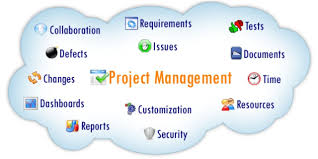
Project and task management tools help businesses organize work, assign responsibilities, and track progress all in one place. They remove confusion around priorities and deadlines, making workflows smoother.
Why it matters:
Small teams often handle multiple tasks simultaneously. A centralized system ensures nothing gets overlooked.
Popular options: ClickUp, Asana
Best for: Managing client projects, planning content, and organizing internal operations
Tip: Start with simple task lists and deadlines, then gradually add features like automation.
2. Visual Kanban and Workflow Boards
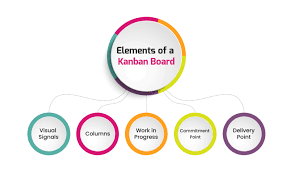
Kanban-style tools use visual boards to show the stages of work, such as “To Do,” “In Progress,” and “Completed.” They are ideal for businesses that prefer a simple and visual approach.
Why it matters:
Visual boards improve accountability and help tasks move faster from start to finish.
Popular options: Trello, Kanban-based boards
Best for: Bloggers, marketing teams, and service workflows
Tip: Limit the number of tasks in progress at a time to avoid overload.
3. All-in-One Workspace and Knowledge Management

All-in-one workspace tools combine notes, documents, databases, and internal wikis in one place, creating a central hub for your business knowledge.
Why it matters:
Processes, SOPs, and ideas remain documented and easily accessible, even as the team grows.
Popular options: Notion, Coda
Best for: SOPs, onboarding new team members, and managing content calendars
Tip: Create reusable templates for recurring processes to save time.
4. Team Communication Tools

Communication platforms reduce reliance on long email threads and enable real-time or asynchronous messaging for faster decision-making.
Why it matters:
Clear communication improves collaboration and prevents misunderstandings.
Popular options: Slack, Microsoft Teams
Best for: Remote teams and client coordination
Tip: Use channels for specific topics and threads for focused discussions.
5. Document Collaboration and Cloud Storage

Cloud-based document tools allow multiple team members to edit files simultaneously and access them from anywhere.
Why it matters:
Real-time collaboration saves time and prevents version conflicts.
Popular options: Google Workspace, Microsoft 365
Best for: Reports, proposals, spreadsheets
Tip: Maintain consistent folder naming conventions and regularly archive outdated files.
6. Scheduling and Calendar Management Tools
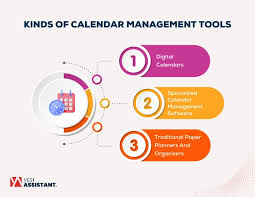
Scheduling tools remove the back-and-forth emails typically needed to book meetings and appointments.
Why it matters:
They save time, reduce no-shows, and improve professionalism.
Popular options: Calendly, integrated calendar booking tools
Best for: Consultants, service providers, and coaches
Tip: Set buffer times between meetings to prevent burnout.
7. Automation and Integration Tools

Automation tools connect different apps and handle repetitive tasks like data entry, notifications, and follow-ups.
Why it matters:
Automation reduces manual work and minimizes human errors.
Popular options: Zapier, Make
Best for: Lead management, form submissions, and reporting
Tip: Start by automating small tasks and measure the time saved.
8. CRM and Lead Management Tools

Customer Relationship Management (CRM) tools help businesses track leads, manage customer interactions, and automate follow-ups.
Why it matters:
Consistent follow-up increases conversions and builds trust with customers.
Popular options: HubSpot CRM, Zoho CRM, Pipedrive
Best for: Sales teams and service-based businesses
Tip: Keep pipelines simple with clearly defined stages.
9. Time Tracking and Focus Tools

Time tracking tools show how work hours are being spent and highlight areas where productivity can be improved.
Why it matters:
Understanding time usage allows better planning and accurate billing.
Popular options: Toggl, RescueTime, Todoist
Best for: Freelancers and remote teams
Tip: Use reports to identify and eliminate low-value activities.
10. Security and Password Management Tools

Password managers securely store and share login credentials across teams.
Why it matters:
They enhance security and save time searching for passwords.
Popular options: 1Password, Bitwarden, LastPass
Best for: Teams using multiple tools and platforms
Tip: Enable two-factor authentication for extra protection.
Choosing the Right Productivity Tools
Before adopting any tool, small businesses should:
- Identify the biggest workflow challenges
- Select tools that integrate well with existing systems
- Avoid overload by focusing on essential tools
- Measure results using productivity metrics
A small, well-integrated set of tools is always more effective than using too many apps at once.
Final Thoughts
Productivity tools are not just about working faster — they are about working smarter. The right tools help small businesses stay organized, improve communication, and free up time for growth-focused work. Start small, train your team, automate repetitive tasks, and your business systems will scale smoothly.
Investing in productivity tools is ultimately an investment in long-term success.
Which of these tools have you tried in your business? Share your experience in the comments below!
“Check out ClickUp for better project management.https://infovistaworld.com/top-10-productivity-tools-for-social-media-scheduling-2/