Introduction
Google updates are a challenge for every blogger, and the Google update 2026 was no different. Many websites experienced a sudden traffic drop, rankings went down, and clicks showed a noticeable decrease. If your blog has also been affected by this update, there is no need to worry.
On my website INFOVISTAWORLD.COM, I will tell you how you can use these tools to benefit from them, how you can save your time, and how you can make your work easier. I have also included many of my personal experiences in this, which are very helpful for you.
The reality is that the main purpose of Google updates is to remove low-quality content and promote high-quality, user-focused content. In this article, we will understand in detail why traffic drops happen and what are the best proven ways to recover it.
What Happened in Google Update 2026?
Google Core Update 2026 specially focused on:
Helpful content
Real user experience
Authentic information
Spam reduction
After this update, those websites got more benefit that were genuinely providing value to users, while low-effort blogs faced ranking loss.
Why Your Traffic Dropped After Google Update
1. Thin or Low-Quality Content
If your blog posts are short or do not provide proper detail, Google ignores them.
2. Outdated Information
Old content that is not updated slowly loses ranking.
3. Poor On-Page SEO
Missing headings, improper keywords, and weak structure can also be an issue.
4. Weak Backlink Profile
If you do not have strong backlinks, competitors can outrank you.
5. Bad User Experience
Slow loading speed, ads overload, or mobile issues directly affect ranking.
Best Ways to Recover Lost Traffic (Step-by-Step Guide)
1. Perform a Content Audit
Content audit is a process in which you create a list of all your website content and check which page is working properly and which is not. Its purpose is to improve SEO and keep user experience top-notch.
First of all see why you are doing the audit. Is it to increase traffic? Or to delete old content? Also decide whether you are doing a full website audit or only the blog section.
First of all do your website audit:
Which posts are down
Which posts are bringing traffic
Which posts are outdated
This step gives you clear direction
2. Update and Refresh Old Content
Updating old content is the easiest and cheapest way to increase website traffic. Google always prefers fresh and updated information.
First target those pages that are ranking on the 2nd or 3rd page of Google. By giving them a little attention, you can easily bring them to the 1st page.
Updating old posts is a very powerful strategy:
Latest data add karo
New headings include karo
Better formatting use karo
Google prefers fresh content
3. Improve Content Depth and Quality
Improving content depth and quality does not only mean making the article longer, but providing complete and correct information to the user. If your content is “thin” (incomplete), Google will not rank it.
See what the user is searching for. If they are searching for “How to”, then write a step-by-step guide.
Also check competitors’ articles. What are they missing? Include that in your content.
Every article should be:
Detailed banao (1000–1500+ words)
Examples add karo
FAQs include karo
Aim: user should get complete solution
4. Optimize for Search Intent
Search intent (meaning user’s intention) understanding is the most important part of SEO. Google now does not only look at keywords, but also what the user actually wants.
For this, write How-to guides, blog posts, and tutorials. These should have long and detailed answers.Here is the link you can copy:
https://developers.google.com/search/docs/fundamentals/seo-starter-guide
Matching search intent is very important:
Informational content
Problem-solving content
Step-by-step guides
If intent does not match, ranking will not come
5. Fix Technical SEO Issues
Technical SEO means improving your website backend and structure so that Google bots can easily crawl and index your content. If technical SEO is bad, even good content will not rank.
If your website takes more than 3 seconds to load, users leave.
Technical SEO should not be ignored:
Website speed improve karo
Mobile friendly design rakho
Broken links fix karo
6. Remove or Improve Low-Performing Content
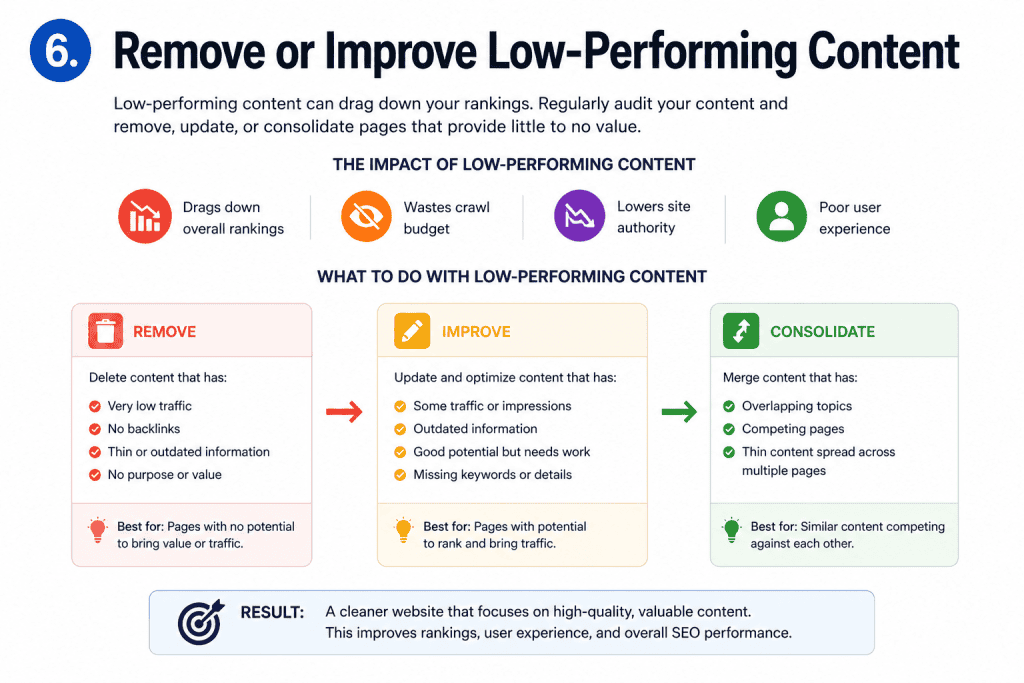
Low-performing content (pages with no traffic and no backlinks) harms your website SEO health. This is called “Content Pruning”. It saves Google crawl budget and helps important pages perform better.
Thin content:
Improve karo
OR delete karke redirect karo
This improves overall site quality
7. Build High-Quality Backlinks
Backlinks mean when other websites link to your website. In Google’s eyes, this is a “Vote of Confidence”. The more high-quality backlinks you have, the more your website authority (DA) will increase.
Write articles for big and popular websites related to your niche and get your link in return.https://infovistaworld.com/build-high-quality-backlinks/
Backlinks are an important part of SEO:
Guest posting karo
Authority sites se links lo
Quality > quantity
8. Improve CTR (Click Through Rate)
CTR (Click-Through Rate) means how many percent people see your link in Google search results and click on it. If you are on the 1st page but no one is clicking, then ranking will drop.
Your title should be such that a person is forced to click on it. Use emotional or powerful words in the title (for example: “Amazing”, “Easy”, “Secret”, “Proven”).https://search.google.com/search-console
If there are impressions but no clicks:
Make the title attractive
Use numbers
Add power words
9. Optimize Core Web Vitals
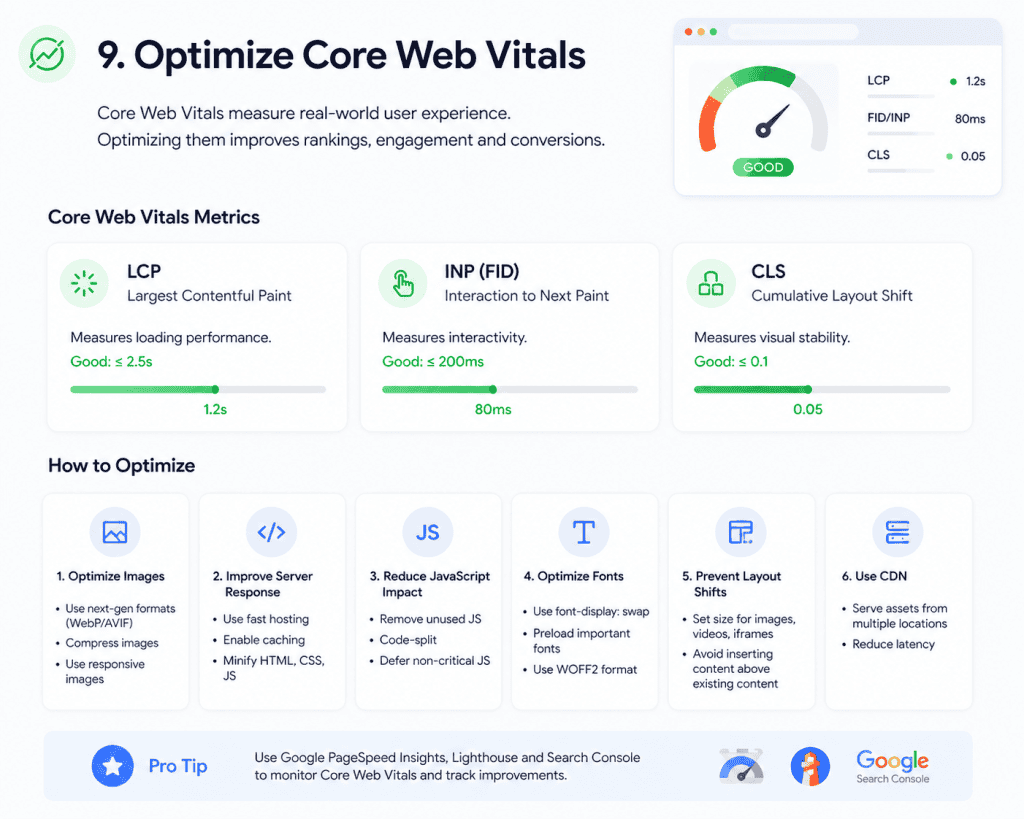
Core Web Vitals are those Google metrics that show how your website’s User Experience (UX) is. If your site is slow or its buttons move while loading, Google will drop your ranking.
It means how fast the main part of your page (usually main image or heading) appears. This should be under 2.5 seconds.
Google gives importance to user experience:
Fast loading (<2.5s)
Stable layout
Smooth interaction
10. Use Internal Linking Strategy
Internal linking means linking one page of your website to another page of your own website. This is important for SEO because it helps Google understand your website structure and spreads “Link Juice” (ranking power) across the site.
If you have a main page like “Digital Marketing Guide”, link it with smaller articles like “SEO Tips”, “Email Marketing”, and “Social Media Ads”. This shows Google that you are an expert in this topic.
Internal linking:
Improves SEO
Reduces bounce rate
Add relevant links in every post
11. Focus on Long-Tail Keywords
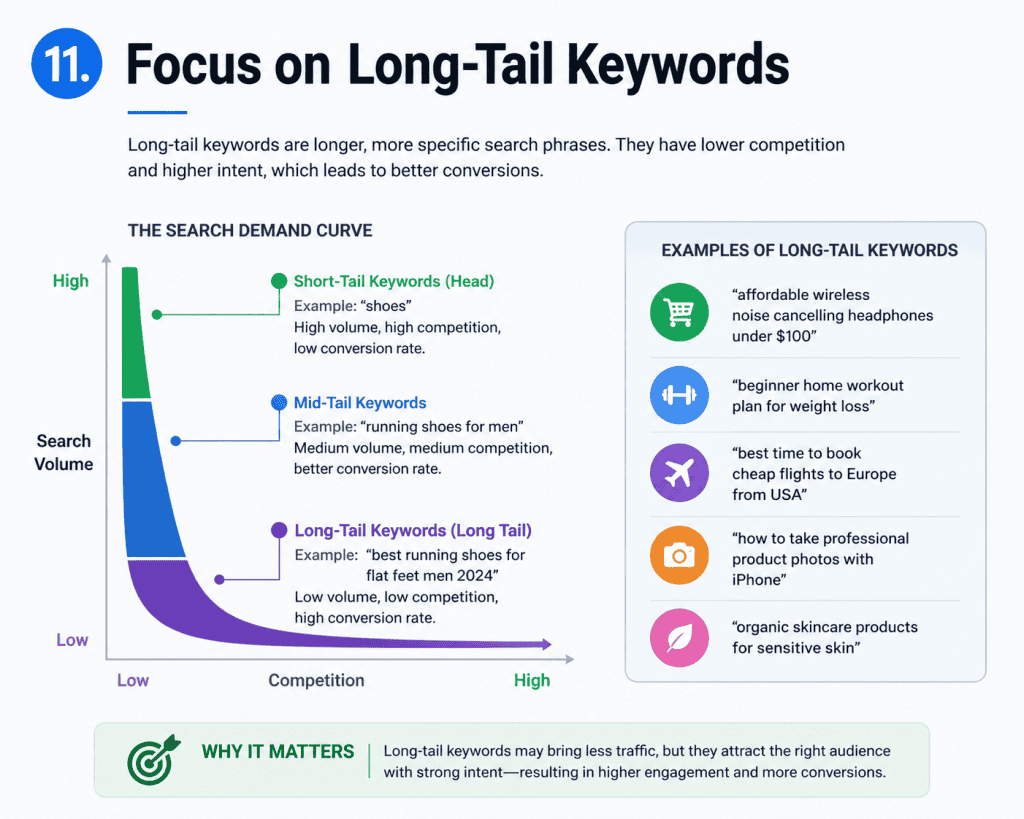
Long-tail keywords are long and specific phrases that have low search volume but very high conversion rate. For example, instead of “Shoes”, “black leather formal shoes for men” is a long-tail keyword.
Ranking on big keywords like “SEO” is very difficult. But ranking on “SEO tips for small businesses in Pakistan” is much easier because big websites usually don’t target it.
Short keywords have more competition.
Long-tail keywords:
Easy to rank
Bring targeted traffic
12. Stay Consistent with Posting
For SEO and digital growth, consistency is the biggest key. Google trusts those websites more that regularly upload new content and refresh their old content.
Instead of posting useless content daily, it is better to post 2 to 3 times a week such content that is really useful for users. Google does not like spammy frequency.
Consistency is very important:
Publish 2–3 posts weekly
Focus on same niche
Advanced Recovery Strategies (2026)
Smart Use of AI Tools
Use AI tools but:
Not copy paste
Add human touch
Build Topical Authority
Choose one niche and write multiple articles on it.
Use Structured Data
Use schema markup so that:
Featured snippets can be achieved
Visibility increases
Common Mistakes to Avoid
❌ Keyword stuffing
❌ Duplicate content
❌ Low-value articles
❌ Ignoring mobile users
❌ Overloading ads
How Long Does Recovery Take?
Recovery is not instant:
2–4 weeks: minor improvement
1–3 months: noticeable growth
3–6 months: full recovery
Patience is key
Conclusion
Google Update 2026 has shaken the blogging world, but it is also an opportunity to improve your website. If you follow high-quality content, proper SEO, and user-focused strategy, you can easily recover your lost traffic.
If you read my blog carefully, you will find solutions to all traffic-related problems. I have included many of my personal experiences as the base of this content. I hope this will be very helpful for you and make your work easier… and please tell me in the comment box how you liked it.
Consistency, patience and smart work are the keys to success.
Best 10 AI Apps for On-Page SEOLearn how to build high-quality backlinks to improve your website authority and search engine rankings. This guide explains proven strategies to get natural, powerful links from trusted sites. Boost your SEO performance and increase organic traffic with effective backlink techniques.
https://infovistaworld.com/10-hidden-free-ai-tools-2026/
Discover powerful hidden free AI tools that most people don’t know about in 2026.
These tools help you save time, boost productivity, and improve daily online work.
A complete guide to smart, underrated AI tools for students, bloggers, and creators.
https://infovistaworld.com/best-8-ai-tools-for-youtube-automation/
Learn the best AI tools that automate YouTube content creation and channel growth.
These tools help with video editing, script writing, thumbnails, and SEO optimization.
Perfect guide for growing your YouTube channel faster with less effort.